NetBox#
| Description | The EDA NetBox app integrates with NetBox to synchronize EDA resources with NetBox |
| Supported OS | N/A |
| Catalog | nokia-eda/catalog |
Overview#
The NetBox app enables users to integrate/synchronize various resources between NetBox and EDA by providing the following resource types:
- Instance: Defines the target NetBox instance to interact with.
- Allocation: Specifies the type of EDA allocation to create based on a NetBox source object (
Prefix,ASN RangeorVLAN Group). - ApplyTopology / ApplyAllocation: Workflow CRDs to import a NetBox Site or re-reconcile a single Allocation on demand. See Workflows.
Corresponding Instance and Allocation resources must be created in the same namespace.
The Allocation controller looks up the referenced Instance by name within the Allocation's own namespace. Creating these resources outside the EDA base namespace (for example, in eda or another user namespace) is recommended so that EDA-managed objects pushed back to NetBox are scoped per user namespace.
EDA continues to use its own allocation pools for IP addresses, indices and subnets, but the NetBox app dynamically creates those pools from NetBox's IPAM > Prefixes, IPAM > ASN Ranges and IPAM > VLAN Groups objects, and posts the allocated objects back to NetBox.
This mode of operation allows the users to leverage NetBox's IPAM features and dynamically create the allocation pools in EDA. Check out the end-to-end example for more details.
Supported objects#
The NetBox app drives EDA's allocation pools from three different NetBox source objects: Prefixes, ASN Ranges, and VLAN Groups. The allocation pool type that can be created depends on the source object kind, and for Prefixes it also depends on the Prefix's Status.
| NetBox source object | NetBox status | Suitable EDA Allocation Pools | Example usage in EDA |
|---|---|---|---|
| IPAM > Prefix | Active | IP Address (IPAllocationPool),IP Address + Mask ( IPInSubnetAllocationPool) | System IP Management IP |
| IPAM > Prefix | Container | Subnet (SubnetAllocationPool) | ISL subnet |
| IPAM > ASN Range | ASN Index (IndexAllocationPool) | BGP ASN allocation | |
| IPAM > VLAN Group | VLAN Index (IndexAllocationPool) | VLAN ID allocation |
In addition, when Instance.spec.sync.enabled is true, EDA pushes its TopoNode/TopoLink objects back into NetBox as Devices and Cables. See Topology Sync.
NetBox Configuration#
Create a Webhook#
A NetBox event rule triggers the webhook, which sends updates to the EDA app.
- Name: Any meaningful identifier
-
URL:
https://${EDA_ADDR}:${EDA_PORT}/core/httpproxy/v1/netbox/webhook/${INSTANCE_NAMESPACE}/${INSTANCE_NAME}
Replace the${INSTANCE_NAMESPACE}with the EDA namespace name you will use to create the NetBox Instance custom resource later. The${INSTANCE_NAME}should be the name of the NetBox Instance custom resource you will create in the Instance Custom Resource section.For example, if you want to create EDA-NetBox integration for the EDA Allocation pools in the
edanamespace, and you will name your NetBox Instance CR simplynetbox, then the URL will be: -
Method:
POST - Secret: Choose a signature secret (plaintext string) that will be used to validate the webhook request. The matching Kubernetes secret with the same string will be created later in the Kubernetes Secrets section.
- SSL verification: Based on your setup either leave SSL verification enabled or disable it.
- Leave all other settings as default.
Create an Event Rule#
An event rule is used to trigger webhook based on the events happening in NetBox. You will find the Event Rules menu item under the Integrations section in NetBox.
- Name: Choose a relevant name
- Objects: Include the NetBox object types that EDA needs to react to. The controller currently handles events for:
- IPAM:
IPAddress,Prefix,ASN,ASNRange,VLAN,VLANGroup - DCIM:
Device,DeviceType,Site,Cable
- IPAM:
- Enabled: Yes
-
Event Types:
- Object created
- Object updated
- Object deleted
-
Action:
- Type: Webhook
- Webhook: Select the one created above
Generate an API Token#
Using the Admin → Authentication → API Tokens menu create a NetBox API token for the NetBox user that EDA app will use. Enable write permission for the API token.
Configure User Permissions#
In the Admin → Authentication → Permissions menu, grant the user you created the API token for the permissions to create, update, and delete for the following objects:
IPAM > IPAddressIPAM > PrefixIPAM > ASNIPAM > ASNRangeIPAM > VLANIPAM > VLANGroupDCIM > SiteDCIM > DeviceDCIM > DeviceTypeDCIM > CableExtras > Tag(a.k.aCustomizations.Tagsin earlier versions)Extras > Custom Field(a.k.aCustomizations.CustomFieldsin earlier versions)
The DCIM permissions are required when Topology Sync is enabled (Instance.spec.sync.enabled = true); without sync, only read access on those types is needed.
Configure Global VRF Setting#
Starting with NetBox 4.2.6, the ENFORCE_GLOBAL_UNIQUE setting is true by default, which may negatively affect EDA installations that use multiple topologies with the same IP addressing.
As per the NetBox documentation, to relax this enforcement change the configuration setting of the global VRF via environment variable or in the configuration.py file.
Tags#
In case you plan to have more than one "NetBox source object" to "EDA allocation pool" mapping, you will need to create a tag in NetBox for each distinct allocation pool and assign it to the matching Prefix, ASN Range or VLAN Group object in NetBox.
In the EDA Allocation resource you then reference the tag name in the tags field and the allocation pool will be created based on the source objects carrying that tag.
EDA-managed objects#
The NetBox app reserves the EDAManaged tag (and the matching eda_managed custom field on supported types) to mark NetBox objects that EDA created or claimed:
- IP Addresses, ASNs and VLANs handed out from EDA allocation pools are tagged
EDAManagedso users can easily filter them in NetBox. - When Topology Sync is enabled, the Sites, Devices, Device Types and Cables that EDA pushes back to NetBox are also tagged
EDAManaged.
Both the tag and the custom field are created automatically by the controller on the first reconcile; do not remove or rename them. Only EDA should mutate objects carrying the EDAManaged tag.
Kubernetes Secrets#
The NetBox API Token and the Webhook secret must be created as Kubernetes Secrets in the same namespace where the EDA NetBox app will run (example: eda). The data for these secrets must be provided as base64 encoded strings.
Secret for the webhook:
Secret for the API Token:
EDA Configuration#
Installation#
Install the NetBox app from the EDA Store or with kubectl:
The NetBox app depends on the EDA Topology app (topologies.eda.nokia.com ≥ v6.0.0). The Topology app is installed by default with EDA, so this is only relevant when running stripped-down deployments.
Install Settings#
The app exposes install-time settings that tune the controller pod:
netboxCpuLimit: CPU limit for the NetBox controller. Default:"1". Requests are fixed at500m.netboxMemoryLimit: Memory limit for the NetBox controller. Default:"1Gi". Requests are fixed at500Mi.netboxProxyConfig: Name of a ConfigMap that suppliesHTTP_PROXY,HTTPS_PROXYandNO_PROXYenv vars to the controller (for reaching NetBox through a corporate proxy). Default:"proxy-config". The ConfigMap must exist in the same namespace as the controller pod; if no proxy is required, leave the ConfigMap absent and the env vars will simply be empty.
These can be edited via the EDA UI (App Settings) at installation time.
Instance Resource#
Defines connection details to the NetBox instance from the EDA NetBox app:
apiVersion: netbox.eda.nokia.com/v1alpha1
kind: Instance
metadata:
name: netbox1
namespace: eda
spec:
url: http://${NETBOX_ADDR}:${NETBOX_PORT}
# Name of a secret containing the base64-encoded API token
# under the `apiToken` key
apiToken: netbox-api-token
# Name of a secret containing the base64-encoded signature key
# under the `signatureKey` key
signatureKey: netbox-webhook-signature
cat << 'EOF' | kubectl apply -f -
apiVersion: netbox.eda.nokia.com/v1alpha1
kind: Instance
metadata:
name: netbox1
namespace: eda
spec:
url: http://${NETBOX_ADDR}:${NETBOX_PORT}
# Name of a secret containing the base64-encoded API token
# under the `apiToken` key
apiToken: netbox-api-token
# Name of a secret containing the base64-encoded signature key
# under the `signatureKey` key
signatureKey: netbox-webhook-signature
EOF
The NetBox Instance resource requires a user to provide names of the two Kubernetes secrets created in the same namespace where the Instance is deployed:
- The
apiTokenfield references the secret containing the NetBox API Token. The secret must define the keyapiToken. - The
signatureKeyfield references the secret containing the Webhook signature secret. The secret must define the keysignatureKey.
After creation, check the status of the Instance resource to verify successful connection. The status fields are:
reachable: whether the controller can currently reach the NetBox APIerrorReason: human-readable error reason whenreachableisfalselastChecked: timestamp of the most recent connectivity probe (driven byspec.checkInterval)
Optional Instance Settings#
The Instance resource also supports the following optional fields:
checkInterval: how often the controller probes the NetBox API for reachability. Default:1m.timeout: per-request timeout for calls to the NetBox API. Default:10s.tls.skipVerify: iftrue, skip verification of the certificate returned by NetBox. Default:false.tls.trustBundle: name of a ConfigMap (in the Instance namespace) that exposes additional trust roots under the keytrust-bundle.pem.sync.enabled: iftrue, EDA pushes itsTopoNode/TopoLinkobjects back into NetBox as Devices and Cables. See Topology Sync. Default:false.sync.region,sync.tenant: NetBox Region and Tenant to associate with the synced Site. Used only whensync.enabledistrue.disableWebhook: iftrue, the controller stops reconciling Allocations on incoming NetBox webhook events. Useful for one-off bulk imports. Default:false.
Allocation Resource#
With Allocation resource a user specifies which NetBox source objects (Prefixes, ASN Ranges or VLAN Groups) should create which EDA allocation pools.
apiVersion: netbox.eda.nokia.com/v1alpha1
kind: Allocation
metadata:
name: netbox-isl-pool
namespace: eda
spec:
enabled: true
instance: netbox # <-- Reference to the Instance resource
tags:
- eda-isl-pool # <-- Must match tags on NetBox prefixes
type: subnet # <-- One of: ip-address, ip-in-subnet, subnet, asn, vlan
cat << 'EOF' | kubectl apply -f -
apiVersion: netbox.eda.nokia.com/v1alpha1
kind: Allocation
metadata:
name: netbox-isl-pool
namespace: eda
spec:
enabled: true
instance: netbox # <-- Reference to the Instance resource
tags:
- eda-isl-pool # <-- Must match tags on NetBox prefixes
type: subnet # <-- One of: ip-address, ip-in-subnet, subnet, asn, vlan
EOF
The name of the Allocation resource will drive the name of the EDA allocation pool.
With tags a user selects which tagged Prefixes, ASN Ranges or VLAN Groups from NetBox should be "mapped" to this Allocation resource. Since these NetBox objects don't have a unique name, the tags are used to identify them.
The type field selects which NetBox source object the Allocation matches and which EDA allocation pool kind is produced:
| Type | NetBox source | Resource Created | Typical Use |
|---|---|---|---|
ip-address | Prefix (Active) | ipallocationpools.core.eda.nokia.com | IP Addresses to System IPs |
ip-in-subnet | Prefix (Active) | ipinsubnetallocationpools.core.eda.nokia.com | IP Addresses + Masks to Management IP |
subnet | Prefix (Container) | subnetallocationpools.core.eda.nokia.com | Subnets to ISL links |
asn | ASN Range | indexallocationpools.core.eda.nokia.com | BGP ASN allocation |
vlan | VLAN Group | indexallocationpools.core.eda.nokia.com | VLAN ID allocation |
For subnet, set spec.subnetLength to the prefix length to carve out from each matched container Prefix. For asn and vlan, the matched ranges/groups in NetBox must already be tagged with one of the tags listed in spec.tags.
Consult the Supported Objects section to see what status a NetBox prefix must have to be compatible with the desired allocation pool type.
The status field of the Allocation resource is used to track the matching allocations. For example, consider the following status block in the Allocation resource:
apiVersion: netbox.eda.nokia.com/v1alpha1
kind: Allocation
metadata:
name: nb-systemip-v4
namespace: eda
labels: {}
annotations: {}
spec:
enabled: true
instance: netbox
tags:
- eda-systemip-v4
type: ip-address
description: ''
subnetLength: null
status:
matchedPrefixes:
- id: 3
prefix: 192.168.10.0/24
tags:
- eda-systemip-v4
lastEvent: ''
lastEventStatus: ''
lastEventTime: null
It indicates that the NetBox prefix 192.168.10.0/24, received via webhook, tagged with the eda-systemip-v4 tag was recorded with the ID 3 for this Allocation resource.
The lastEvent, lastEventStatus and lastEventTime fields are reserved for surfacing the most recent reconcile/webhook event observed for this Allocation. They may be empty until the controller records an event for the resource.
Topology Sync#
When Instance.spec.sync.enabled is set to true, the NetBox app pushes EDA topology objects back to NetBox so that NetBox stays in sync with the deployed fabric:
- EDA
TopoNodeobjects are created/updated as NetBox Devices (with their DeviceTypes and the parent Site). - EDA
TopoLinkobjects are created/updated as NetBox Cables between the corresponding device interfaces. - The synced Site, Devices, DeviceTypes and Cables are tagged
EDAManaged(see EDA-managed objects). Instance.spec.sync.regionandInstance.spec.sync.tenantset the NetBox Region and Tenant for the synced Site.
Sync only runs while the Instance is reachable and stops cleanly on disconnect; it resumes automatically when reachability is restored.
Workflows#
The NetBox app ships two workflow CRDs that allow a user to drive sync and allocation operations on demand from the EDA UI or via kubectl:
ApplyAllocation#
Triggers an out-of-band reconcile of an Allocation resource against its NetBox source. Useful when the webhook flow has been disabled (Instance.spec.disableWebhook = true) or after a bulk edit in NetBox.
apiVersion: netbox.eda.nokia.com/v1alpha1
kind: ApplyAllocation
metadata:
name: reapply-systemip-v4
namespace: eda
spec:
allocation: nb-systemip-v4 # <-- Reference to an existing Allocation in the same namespace
ApplyTopology#
Imports a NetBox Site (its Devices and Cables) into EDA as TopoNode/TopoLink objects in the workflow's namespace. Useful for bootstrapping an EDA topology from an existing NetBox source of truth. Only SR Linux devices are materialized as TopoNode objects. Non-SRL devices are still fetched (so they can act as remote endpoints for edge cables), but they will not appear in the resulting NetworkTopology spec.
apiVersion: netbox.eda.nokia.com/v1alpha1
kind: ApplyTopology
metadata:
name: my-topology-sync
namespace: eda
spec:
instanceName: netbox # <-- Reference to the Instance resource
siteName: eda # <-- NetBox Site to import
# Optional: filter Devices by tags. Each inner list is AND, the outer list is OR.
# Empty or omitted = sync all Devices in the Site.
deviceTags:
- [eda.nokia.com/role=leaf]
- [eda.nokia.com/role=spine]
instanceName: name of theInstanceresource to use (must live in the same namespace as the workflow).siteName: NetBox Site to import.deviceTags: optional filter on NetBox Devices. Each inner list is AND, the outer list is OR. Empty/omitted means import all Devices in the Site.
Required NetBox Device fields#
Only NetBox Devices whose Platform name is srl are materialized as TopoNode objects. Non-SRL devices are still fetched (so they can act as remote endpoints for edge cables), but they will not appear in the resulting NetworkTopology spec.
In addition, every Device that should become a TopoNode must carry the following NetBox tags in key=value (or key:value) form:
| NetBox tag | Purpose | Required |
|---|---|---|
eda.nokia.com/node-profile=<name> | Selects the EDA NodeProfile to associate with the TopoNode. Must reference an existing profile in the workflow's namespace. | Yes — the workflow fails for any Device missing this tag. |
eda.nokia.com/platform=<value> | Overrides TopoNode.spec.platform. If absent, the NetBox DeviceType model is used as the platform value. | No |
Both reserved tags are consumed by the workflow — they configure the TopoNode spec but are not copied onto the TopoNode as labels.
Tag-to-label conversion#
Every other NetBox Device tag of the form key=value (or key:value) is copied onto the resulting TopoNode as a Kubernetes label:
- Plain string tags (no
=/:separator) are ignored — they cannot be expressed as labels. - Tags whose key starts with
eda.nokia.com/are validated strictly: an invalid Kubernetes qualified name or label value aborts the workflow. - Tags with any other key are validated leniently — invalid pairs are silently dropped instead of failing the run.
- The same rules apply to NetBox Cable tags, which are copied onto the resulting
TopoLinklabels.
On top of the user-provided tags, the workflow always injects two synthetic labels onto each TopoNode so the integration can correlate back to NetBox:
eda.nokia.com/netbox.device.id=<NetBox numeric Device ID>eda.nokia.com/role=<NetBox Device role slug>
Alarms#
The NetBox app surfaces two EDA alarms tied to the Instance resource:
| Alarm | Severity | Triggered when | Cleared when |
|---|---|---|---|
NetBoxInstanceUnreachable | major | The controller has lost connectivity to the NetBox API for the configured probe interval. | Connectivity to the NetBox API is restored. |
NetBoxInstanceConnectionFailed | major | The initial connection to the NetBox API failed (bad URL, invalid token, TLS errors, …). | The Instance is successfully reconnected. |
Both alarms are scoped to the offending Instance resource; consult Instance.status.errorReason for the underlying error text.
Example#
In this example, we will demonstrate how EDA/NetBox integration works by creating two Prefix objects in NetBox for System IPs and inter-switch link subnets that will be synchronized to EDA and result in two Allocation pools in EDA that then will be used to instantiate a Fabric.
We will install a demo NetBox instance1 in the same cluster that runs EDA using helm and the netbox chart v6.0.33:
helm install netbox-server oci://ghcr.io/netbox-community/netbox-chart/netbox \
--create-namespace \
--namespace=netbox \
--set superuser.password=netbox \
--set enforceGlobalUnique=false \ #(1)!
--version 6.0.33 #(2)!
enforceGlobalUnique=falseconfigures the global VRF of NetBox to allow duplicate IP addresses. The duplicated IP addresses may be created by EDA when distinct topologies use the same IP addressing.- We fix the chart version to ensure the reproducibility of the example, but there is no hard dependency on the chart version.
The NetBox instance will take a few minutes to start, you can monitor the pods in the netbox namespace2 and once all pods are up and running, expose the NetBox instance:
You should now be able to login to the NetBox UI via http://localhost:45123 using admin:netbox credentials.
Then install the NetBox EDA app using one of the documented methods.
NetBox configuration
Webhook
Go to Operations → Integrations → Webhook in NetBox UI and create a webhook with the following values:
- Name:
eda -
URL:
https://${EDA_ADDR}:${EDA_PORT}/core/httpproxy/v1/netbox/webhook/eda/netbox
Replace${EDA_ADDR}and${EDA_PORT}with the address and port of the EDA instance you use. -
Secret:
eda - SSL verification: disabled
Event Rule
Go to Operations → Integrations → Event Rules in NetBox UI and create an Event Rule that will trigger the Webhook with the following fields set:
- Name:
eda - Object types:
IPAM > IP AddressIPAM > Prefix
- Enabled: checked
- Event types:
Object createdObject deletedObject updated - Action type:
Webhook - Webhook:
eda(the name of the webhook we created above)
API Token and Permissions
Normally you would generate a new API token for the user you want to use for API access, but since the demo instance of NetBox that we installed with the Helm chart already contains an API token for the admin user, we will just use it, instead of generating a new one.
Create secrets
Now we need to create the Kubernetes secrets for the generated API Token and the Webhook signature secret.
The inputs to the secrets should be in base64 format, therefore the snippets below run the raw inputs through base64 command to convert them to base64 format.
We install the secrets in the eda namespace - the default namespace your EDA installation comes with. If you use another namespace, adjust the namespace name accordingly.
The NetBox Helm chart used in this example creates a Kubernetes secret netbox/netbox-server-superuser which contains the API token for the admin user. We will use the existing token value as is:
NETBOX_API_TOKEN=$(kubectl -n netbox get secret netbox-server-superuser -o jsonpath='{.data.api_token}')
cat << EOF | kubectl apply -f -
apiVersion: v1
kind: Secret
metadata:
  name: netbox-api-token
  namespace: eda
type: Opaque
data:
  # base64-encoded NetBox API token with IPAM permissions
  apiToken: ${NETBOX_API_TOKEN}
EOF
In case you are repeating this exercise without using NetBox Helm chart, or if you run a non-admin user, you will need to generate the API Token manually.
Prefixes and Tags
As per the task of this example we need to create two prefixes in NetBox, one for the System IPs and one for the subnets used by our Fabric app to assign addresses on the point-to-point interswitch links.
We will also create a tag for each of the prefixes, such that we can use the tags to identify each prefix in EDA's Allocation resource.
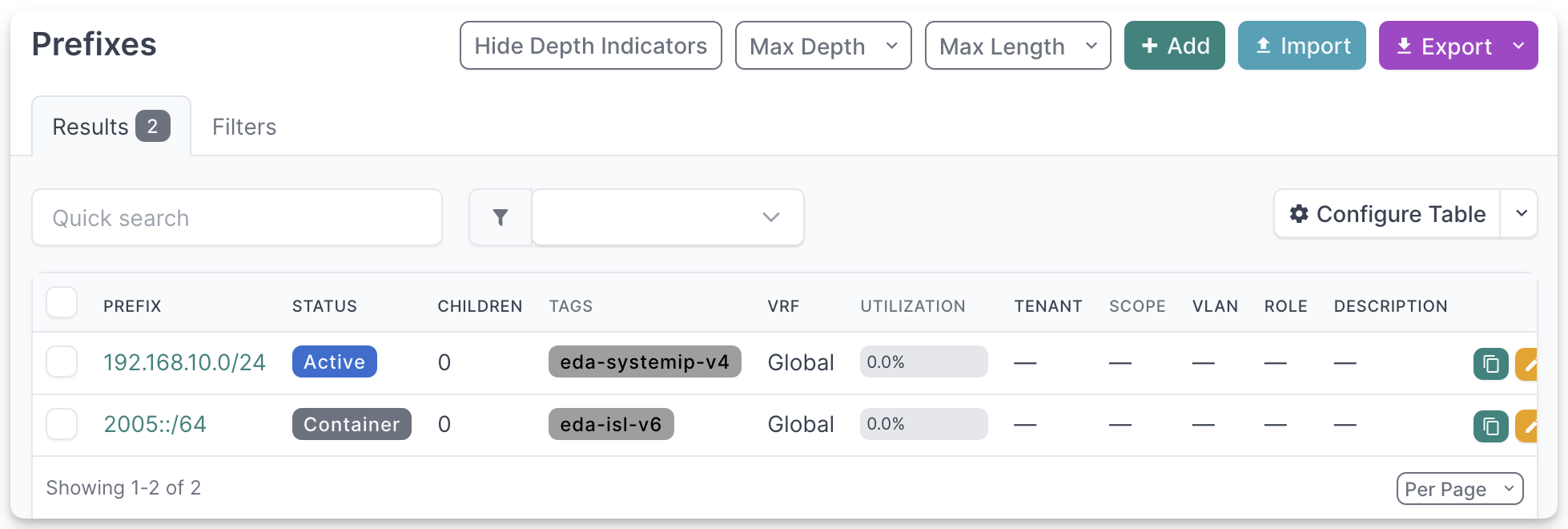
Starting with the System IPs prefix, we first create a Tag using the Customization → Tags NetBox menu, we will name the tag simply eda-systemip-v4.
Then create a prefix in IPAM → Prefixes NetBox menu and specify the 192.168.10.0/24 prefix with the Status=Active and assign the eda-systemip-v4 tag to it.
Next, we need to create a Prefix for our interswitch links. In EDA, the Fabric app uses the allocation pool of type "subnet" to then assign point-to-point addresses to each end of the interswitch link. This means, that the Prefix in NetBox would need to be created with the Container status, as this would indicate that the Prefix is a container for sub-prefixes. Exactly what we need.
We create the eda-isl-v6 tag first and then the Prefix 2005::/64 with the Status=Container and this tag assigned.
EDA configuration
Switching to EDA. Install the NetBox app if you haven't done already and proceed with creation of the NetBox Instance resource as per the documentation.
We are using the names of the Kubernetes secrets we created a moment ago for the API Token and the Webhook signature key. And since we deployed the NetBox inside the same cluster, we know the DNS name of the service it uses.
Shortly after submitting the instance resource, you should see EDA reporting the instance as reachable in the status field of the instance resource. Verify with:
Allocations
Once the Instance resource is configured and the NetBox is reachable, you can proceed with creating the Allocation resources.
As per our task, we need two Allocation Pools in EDA:
IPAllocationPoolfor the IPv4 addresses used as System IPs for our leaf and spinesSubnetAllocationPoolfor the subnets used for the interswitch links in our fabric.
Instead of creating these pools manually, we will create two Allocation resources from the EDA NetBox app and let it create these pools for us based on the NetBox prefixes.
Starting with the Allocation resource for the System IPs:
The name of the Allocation resource (nb-systemip-v4) determines the name of the EDA Allocation Pool that the NetBox app creates based on the received webhook from the NetBox server.
In the specification block of the Allocation resource we provide
- the name of the NetBox instance resource we just created
- the tags to match the received prefixes from the NetBox server and associate with this Allocation. Recall, that we created this tag in NetBox and added it to the Prefix we intend to use for the System IPs.
- the type of the allocation, which will drive the type of the EDA Allocation Pool. Since System IPs are plain IPv4 addresses, we choose
ip-addresstype.
Following the same approach, create the Allocation resource for the subnets used for the interswitch links:
The difference between the two Allocation resources is the type of the allocation. Since subnets are CIDR blocks, we choose the subnet type and we also specify the subnetLength property to define the length of the subnet to allocate from the received prefix.
Once you have the Allocation resources created, you should see the pools with the matching names created in EDA:
Fabric
Next we create a fabric resource using the EDA Playground topology setup in this example. We reference the allocation pools our NetBox app created when it synced the prefixes:
apiVersion: fabrics.eda.nokia.com/v1alpha1
kind: Fabric
metadata:
  name: my-nb-ebgp-fabric
  namespace: eda
spec:
  leafs:
    leafNodeSelector:
      - eda.nokia.com/role=leaf
  spines:
    spineNodeSelector:
      - eda.nokia.com/role=spine
  interSwitchLinks:
    linkSelector:
      - eda.nokia.com/role=interSwitch
    poolIPV6: nb-isl-v6
  systemPoolIPV4: nb-systemip-v4
  underlayProtocol:
    bgp:
      asnPool: asn-pool
    protocol:
      - EBGP
  overlayProtocol:
    protocol: EBGP
cat << 'EOF' | kubectl apply -f -
apiVersion: fabrics.eda.nokia.com/v1alpha1
kind: Fabric
metadata:
  name: my-nb-ebgp-fabric
  namespace: eda
spec:
  leafs:
    leafNodeSelector:
      - eda.nokia.com/role=leaf
  spines:
    spineNodeSelector:
      - eda.nokia.com/role=spine
  interSwitchLinks:
    linkSelector:
      - eda.nokia.com/role=interSwitch
    poolIPV6: nb-isl-v6
  systemPoolIPV4: nb-systemip-v4
  underlayProtocol:
    bgp:
      asnPool: asn-pool
    protocol:
      - EBGP
  overlayProtocol:
    protocol: EBGP
EOF
The Fabric app will use the referenced pools and will try to allocate resources from the pools in order to instantiate a fabric. In our example the System IP (v4) and Subnets (v6) will be allocated from the pools and the allocated resources will be populated back to the NetBox server to keep track of the allocated resources.
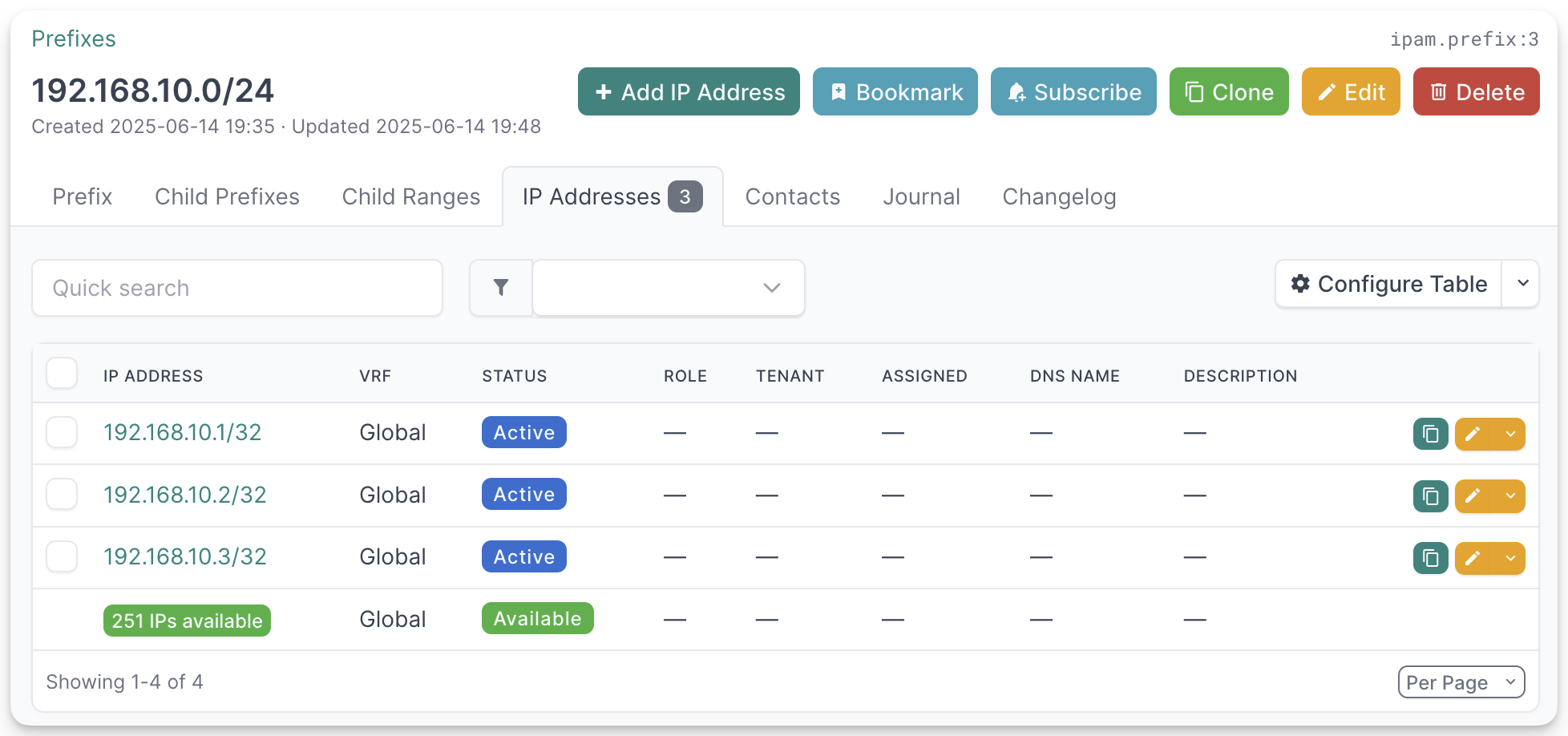
From the Prefix we created for System IPs you will see the three allocated IPs populated back in NetBox server, one per each spine and leaf in our topology:
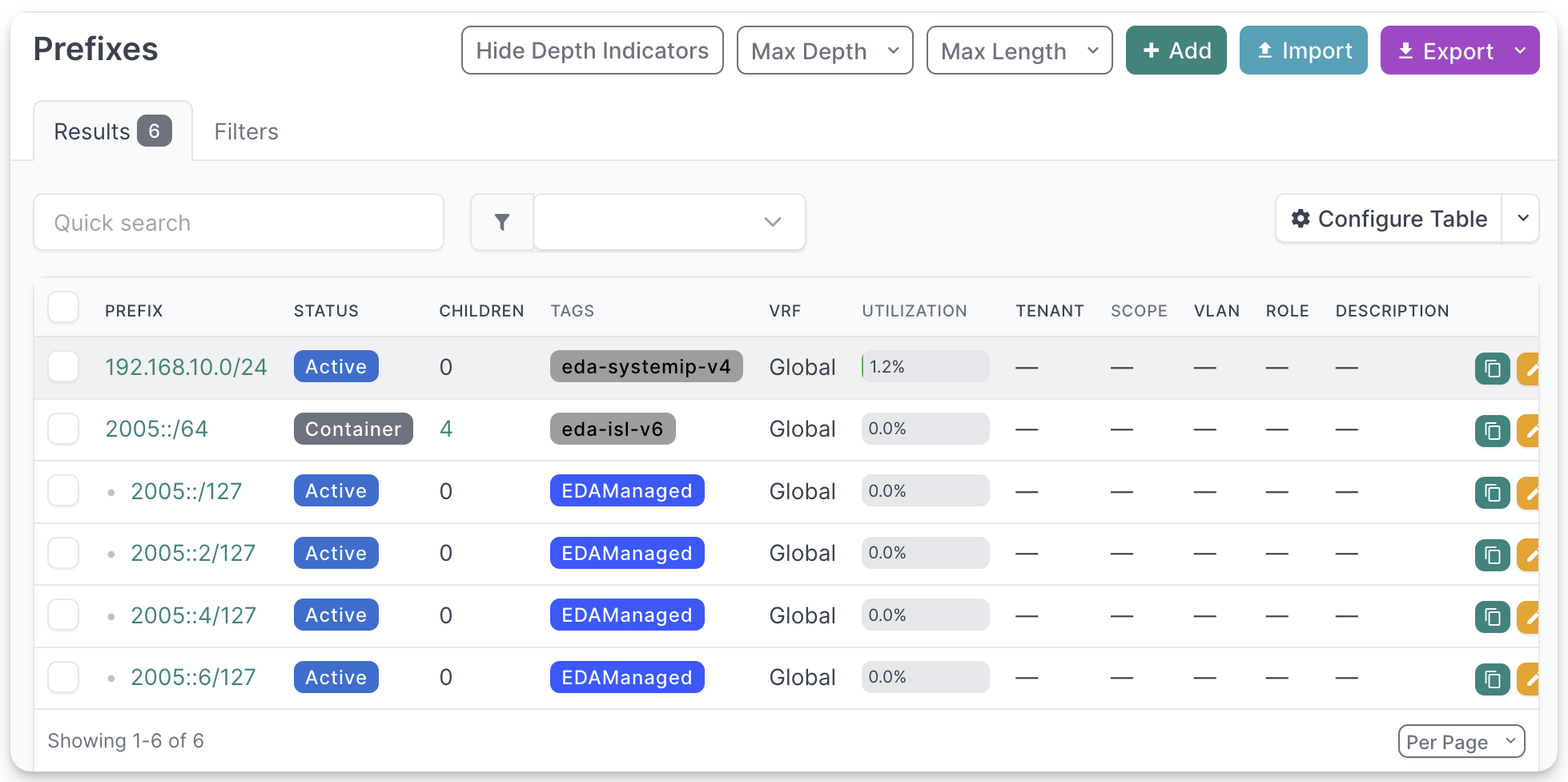
In the same way, you will see interswitch subnets carved out from the 2005::/64 prefix, one per each link between leafs and spines:
Custom Fields
The NetBox app also creates some custom fields in NetBox model to backtrack the allocation of the resources. For example, if you select an allocated sub-prefix from the 2005::/64 prefix, you will see EDA custom fields that show the Allocation resource that created this allocation and the owner object that requested the allocation.
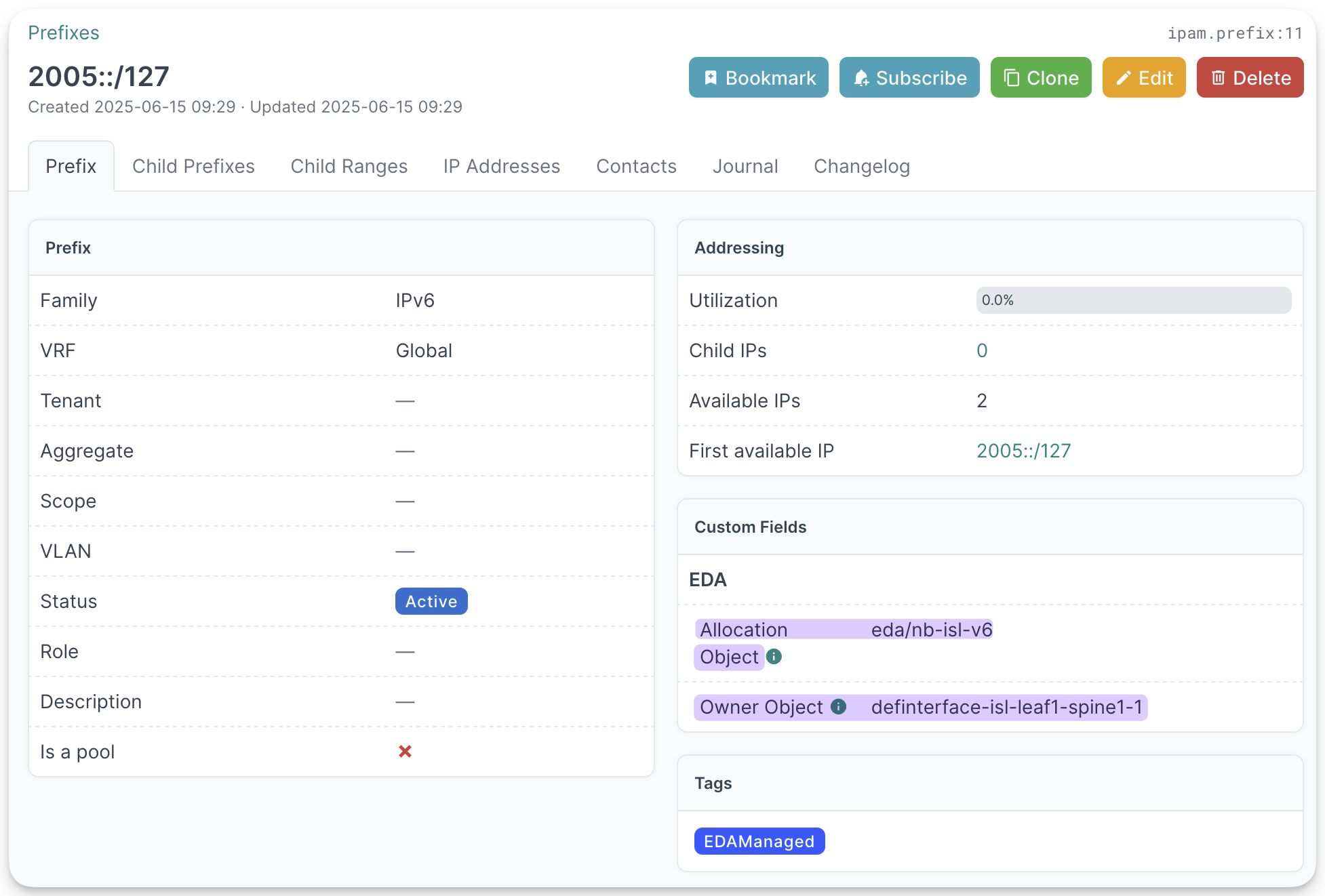
The objects allocated by EDA will also have the EDAManaged tag assigned to them.
-
Based on NetBox Community v4.3.2-Docker-3.3.0 version and Helm chart v6.0.33. ↩
-
Or run a wait with:
↩